How to Download and Interpret BLCASN Data
Published in Articles
Each BLCA device records ground acceleration continuously and stores the hourly data in compressed Parquet format. To work with these data files, users must first download them from the BLCASN platform and convert them to a more accessible format such as CSV or Excel (.xlsx).
To download data:
Create an account on the BLCASN portal.
Apply for Gold Member Access.
After approval by a moderator, users will be able to download hourly Parquet files.
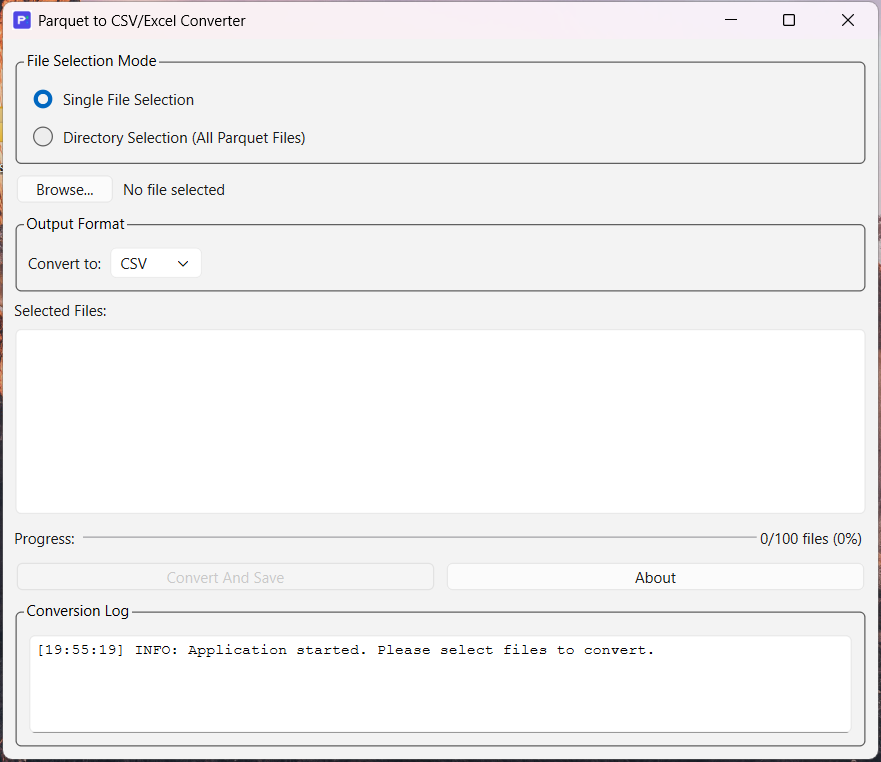
A cross-platform Graphical User Interface (GUI) application is available to convert Parquet files to CSV or Excel format.
The source code is publicly accessible.
Precompiled binaries are available for Windows and Linux.
The interface is designed to be simple and intuitive—select the Parquet file, choose the output format, and click Convert.
Format of Converted Data:
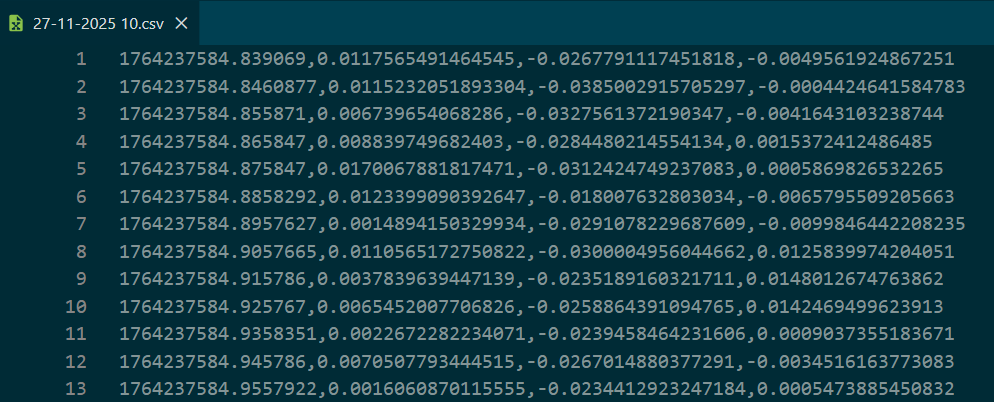
The converted CSV/Excel file contains four columns (without headers):
Timestamp (Unix Epoch Time)
X-axis acceleration (m/s²)
Y-axis acceleration (m/s²)
Z-axis acceleration (m/s²)
To determine the orientation of the horizontal axes (X and Y), users should refer to the specific station page.
For distant or low-magnitude earthquakes, the signal-to-noise ratio may be low. Users may apply filtering or other signal-processing techniques using their preferred tools.
Please cite this network, if you use its data in your research or publications.